LTX-2.5 IC-LoRA Guide: Video Editing and Control in ComfyUI
Explore LTX-2.5 IC-LoRA workflows for pose control, motion guidance, inpainting, outpainting, consistent characters, and video upscaling.
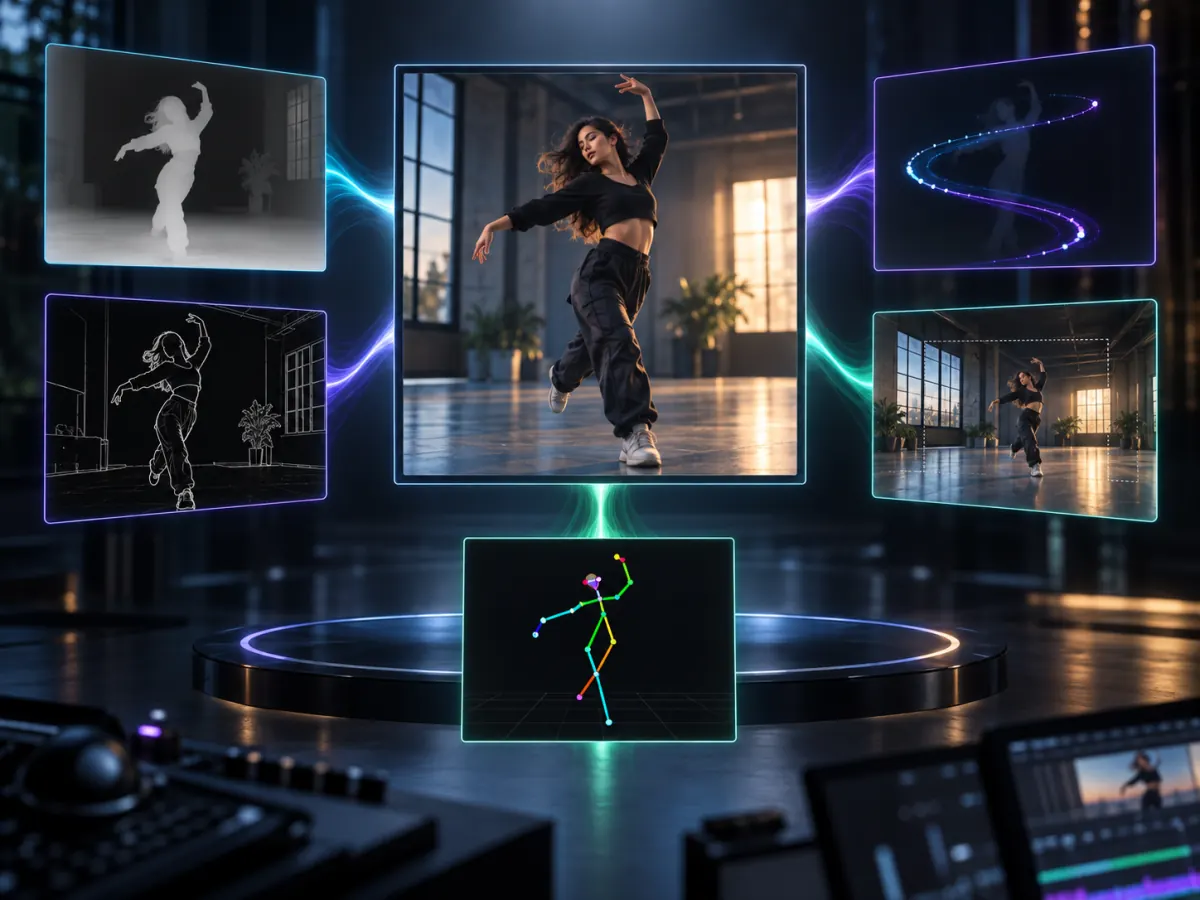
LTX-2.5 IC-LoRA workflows allow the model to use more than a text prompt. Depending on the adapter, the generation can be conditioned by a reference video, depth map, edge map, pose skeleton, motion path, or character reference sheet.
This makes it possible to lock down motion or composition before regenerating the visual appearance. For editing tasks, that is often more reliable than repeatedly rewriting the prompt.
How is IC-LoRA different from a standard LoRA?
A conventional LoRA usually teaches a model a character, style, or visual concept. An IC-LoRA focuses on in-context conditioning: reference information is provided alongside the text prompt and the noisy video latents.
Each adapter is therefore designed for a particular type of control. The official LTX adapter directory currently includes:
- Union Control: Uses depth, Canny edges, or pose to preserve structure.
- Motion Control: Guides object movement with sparse trajectories.
- Ingredients: Maintains characters, props, and locations from a reference sheet.
- In-Outpainting: Replaces masked regions or extends the frame.
- Pixel Spatial Upscaler: Performs generative video upscaling.
- Water Simulation: Adds water, rain, surf, splashes, and wet-surface reflections.
The right adapter depends on what must remain fixed and what the model is allowed to regenerate.
Which LTX-2.5 IC-LoRA workflow should you choose?
Use a video-to-video workflow when the source motion is useful but the appearance needs to change.
Choose Union Control when pose, contours, or spatial structure must remain recognizable. Its single checkpoint can accept depth maps, Canny edges, and pose skeletons, so you do not have to switch adapters for each structural signal.
Choose Motion Control when the important requirement is where an object travels rather than its exact pose in every frame. Choose Ingredients when the shot must preserve the identity of a character, prop, or location from a prepared reference sheet.
Choose Inpainting when only a masked region should be replaced, and Outpainting when the frame needs to become wider or taller. The official inpainting and outpainting guide confirms that both workflows use the same adapter with different mask configurations.
Use the Pixel Spatial Upscaler only after the low-resolution source has clean motion and composition. It is a creative re-render, not a general artifact-removal tool.
Do LTX-2.3 IC-LoRAs work with LTX-2.5?
Some do, but compatibility should not be assumed.
The current LTX-2.5 documentation explicitly reuses the LTX-2.3 Union Control and In-Outpainting checkpoints. Community members have reported success with additional older adapters, but those results are workflow-specific rather than a guarantee that every LTX-2.3 LoRA is compatible.
HDR and Dub-It, for example, are still listed as LTX-2.3-only in the official adapter documentation, with LTX-2.5 support under development. Always check the individual model card before migrating a production graph.
A practical setup sequence
Before loading an adapter, answer three questions:
- What must remain unchanged?
- What may be regenerated?
- Do you need structural control, local editing, identity consistency, or upscaling?
Then build the workflow in small steps:
- Start from the official LTX-2.5 IC-LoRA workflow closest to your task.
- Test a short, low-resolution reference clip.
- Verify that reference dimensions and control inputs match the workflow.
- Add one adapter and one control signal at a time.
- Lock the working graph before increasing duration or resolution.
This prevents a failed result from becoming an unsolvable mix of model compatibility, masking, prompt, and memory problems.
Common LTX-2.5 IC-LoRA mistakes
Choosing a structural adapter for an appearance problem: Pose and edge maps can preserve geometry, but they do not guarantee character identity. Use Ingredients or a suitable identity reference when appearance matters more than structure.
Expecting the upscaler to clean a damaged source: The Pixel Spatial Upscaler expects a clean low-resolution render. Heavy compression, smearing, or broken motion can be reinterpreted rather than repaired.
Changing everything at once: Do not switch the base model, adapter, VAE, resolution, and reference video in one troubleshooting pass. Change one variable and preserve the last known-good graph.
Assuming every old adapter is compatible: Officially reused checkpoints are a safer starting point than community compatibility reports.
A widely shared LTX-2.5 video-to-video example shows why these workflows attract attention. The useful question is no longer only whether the model can generate a clip, but whether reference content can guide a repeatable edit.
LTX-2.5 IC-LoRA turns video generation into a more structured editing pipeline instead of a single unpredictable render.
To understand the model's new fidelity pipeline, read LTX-2.5 DFR explained. Before distributing a customized adapter, review the LTX-2.5 license guide.
Skip the GPU setup. No local install, no VRAM tuning — paste a prompt and render an LTX-2.5 clip in the browser. Try it on ltx-23.org →
Author

LTX-2.5 Editorial Team
The editorial team behind the LTX model guides and workflows published on ltx-23.org.
Categories
More Posts
Ultimate LTX 2.3 ComfyUI Workflow Guide: Trending Reddit & X Setups (2026)
Master the LTX 2.3 ComfyUI workflow for AI video. Learn low VRAM setups, Gemma 3 text encoder tips, and advanced image-to-video techniques from Reddit.
LTX-2.5 ComfyUI OOM Fixes: A Practical VRAM Troubleshooting Guide
Fix LTX-2.5 out-of-memory errors in ComfyUI by isolating model loading, text encoding, sampling, upscaling, and VAE decoding.
LTX-2.5 vs MiniMax H3: Speed, Quality, and Which Model to Use
Compare LTX-2.5 vs MiniMax H3 for speed, motion quality, prompt adherence, local deployment, and production workflows before choosing a model.