Ultimate LTX 2.3 ComfyUI Workflow Guide: Trending Reddit & X Setups (2026)
Master the LTX 2.3 ComfyUI workflow for AI video. Learn low VRAM setups, Gemma 3 text encoder tips, and advanced image-to-video techniques from Reddit.
The release of LTX 2.3 has completely reshaped the landscape of open-source AI video generation. With 22 billion parameters, improved 9:16 vertical video support, and enhanced image-to-video stability, it's the model the community has been waiting for. If you've been scrolling through X (formerly Twitter) or AI subreddits recently, you've likely witnessed the explosive popularity of the LTX 2.3 ComfyUI workflow.
But constructing a stable, high-fidelity LTX 2.3 ComfyUI workflow can be daunting. From managing massive VRAM requirements to properly configuring the Gemma 3 text encoder, there are countless hidden variables. In this comprehensive guide, we will break down the latest trending configurations, low-VRAM survival tips, and everything you need to know to generate cinematic text-to-video (T2V) and image-to-video (I2V) animations.
Why the LTX 2.3 ComfyUI Workflow is Trending
The excitement surrounding LTX 2.3 on platforms like Reddit and X isn't just hype. The model introduces several critical improvements over its predecessors that make a well-tuned LTX 2.3 ComfyUI workflow incredibly powerful:
1. Enhanced Detail and Prompt Adherence
LTX 2.3 features a vastly improved latent space and a larger text connector. This results in far better preservation of fine details—such as skin textures, fabric movements, and hair—as well as stronger adherence to highly complex, multi-sentence prompts.
2. The Power of Gemma 3 12B Text Encoder
One of the most discussed breakthrough elements on Reddit is the integration of the Gemma 3 12B Instruct text encoder. This powerful language model replaces older clip encoders, translating your natural language descriptions into highly structured motion descriptors. A ComfyUI workflow leveraging Gemma ensures that your videos actually reflect the detailed spatial and motion instructions you input, rather than just relying on keyword soup.
3. Reduced "Ken Burns" Effect
Earlier models struggled with static scenes, often defaulting to a simple zoom-and-pan effect (the Ken Burns effect). LTX 2.3 provides robust, authentic localized motion—making subjects move naturally within their environments without the background warping or freezing.
Building the Core LTX 2.3 ComfyUI Workflow
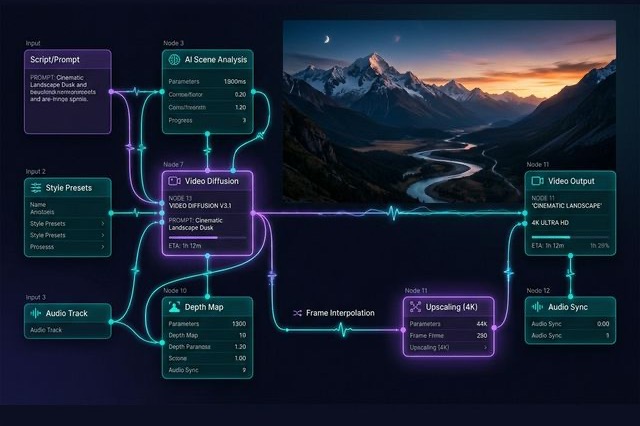
To extract the maximum potential from the LTX 2.3 model, your ComfyUI node setup needs to be meticulous. Based on the most successful templates shared across enthusiast communities, here is how you should structure your workflow.
Essential Prerequisites and Custom Nodes
Before dropping nodes onto the canvas, ensure your ComfyUI environment is prepared. You will need:
- ComfyUI-LTXVideo: The core custom node suite. Install this via the ComfyUI Manager. It will often auto-download required models upon the first run.
- ComfyUI-GGUF: Crucial for running heavily quantized models if you have less than 24GB of VRAM.
- ComfyUI-VideoHelperSuite (VHS): The industry standard for handling video file inputs and MP4 outputs.
The Two-Stage Generation Pipeline (Trending Setup)
The most popular premium-quality LTX 2.3 ComfyUI workflow relies on a two-stage sampling process. This has been widely validated by top creators on X as the optimal balance between coherence and sharpness.
Stage 1: Base Coherence
In the first stage, you generate the video at half the target resolution. This step focuses purely on getting the motion structure, anatomy, and scene coherence correct. Here, you use the MultiModalGuider node to ensure the motion vectors map properly across all frames.
Stage 2: Latent Upscaling
Instead of using a pixel-space upscaler (like Topaz), this workflow uses an LTXVLatentUpsampler to perform a 2x spatial upscale directly in the latent space. This Stage 2 pass adds incredible sharpness and fine detail without destroying the temporal consistency established in Stage 1.
Model Variations: Dev vs. Distilled
Reddit discussions heavily favor using the "Dev" model paired with a distilled LoRA (loaded via LoraLoaderModelOnly). This gives you the high-fidelity stability of the Dev model (using a CFG around 4.0 and 20 steps) while accelerating the render time. The raw Distilled model runs very fast (CFG 1.0, 8 steps) but can sometimes sacrifice micro-details.
Optimizing for Low VRAM (12GB - 16GB)
A full, uncompressed LTX 2.3 setup can easily demand over 40GB of VRAM. Fortunately, the community has rallied to create LTX 2.3 ComfyUI workflow variations that run on consumer hardware, particularly 12GB GPUs like the RTX 3060.
If you are struggling with Out-Of-Memory (OOM) errors, implement these trending low-VRAM strategies:
1. GGUF Quantization is Mandatory
Switch to GGUF quantized models immediately. Using a Q4 K-means GGUF version of LTX 2.3 shrinks the VRAM footprint down to approximately 18GB, and lighter Q3 versions can run comfortably in 12GB. You will need the ComfyUI-GGUF nodes installed to load these files.
2. Isolate the VAE
Popularized by ComfyUI developers on Reddit, separating the Variational AutoEncoder (VAE) from the main model checkpoint can drastically reduce memory spikes during the decoding phase. You can find optimized LTX VAE nodes to handle this efficiently.
3. CPU Offloading for the Text Encoder
The Gemma 3 12B text encoder is massive. If your GPU is choking, use ComfyUI nodes that force the text encoding process to run on your system RAM and CPU. It will take slightly longer initially, but it frees up vital VRAM for the actual video generation process. Also, consider passing the --novram argument to your ComfyUI startup script if the text encoder keeps crashing.
4. Conservative Resolutions
For 12GB cards, stick to lower initial resolutions. A resolution of 480x832 (for vertical) or 768x512 (for wide) is highly recommended for the first pass generation.
Mastering Image-to-Video (I2V) in LTX 2.3
Image-to-Video generation is where LTX 2.3 truly shines. The ability to bring staticMidjourney or Flux generations to life is driving massive engagement on X.
The "First + Last Frame" Technique
One of the most powerful node setups currently trending involves providing both a starting frame and an ending frame. By using specific LTX image-conditioning nodes, you can force the model to hallucinate the transition between the two images. This gives you unparalleled control over the video's narrative flow.
Prompting Strategy for I2V
When utilizing the Gemma text encoder for image-to-video, standard prompting rules change.
- Do not describe static elements (the model already sees the input image).
- Focus on active verbs and motion. Use phrases like "Camera pans slowly left while the subject turns their head towards the lens."
- Describe chronological changes. "Starts with soft lighting, suddenly illuminated by a lightning strike at frame 30."
The Future of Open-Source Video Workflows
The rapid evolution of the LTX 2.3 ComfyUI workflow proves that the gap between open-source tools and proprietary closed-source platforms (like Sora or Gen-3) is closing fast. By leveraging tools like the Gemma 3 text encoder, two-stage sampling, and community-driven GGUF optimizations, anyone with a modern GPU can produce commercial-grade video content.
As you explore these nodes, make sure to save snippets of your workflow. The ComfyUI community is highly collaborative—sharing your unique node configurations on Reddit or X helps push the entire ecosystem forward.
Ready to start creating? Update your ComfyUI Manager, grab the LTXVideo suite, and start rendering the next viral masterpiece.
Author

LTX-2.5 Editorial Team
The editorial team behind the LTX model guides and workflows published on ltx-23.org.
Categories
More Posts

LTX-2.5 Multishot Prompts: A Practical Guide to Better Cuts
Learn how to write LTX-2.5 multishot prompts with clear cuts, consistent characters, continuous audio, and a reusable three-shot prompt example.
LTX-2.5 Low VRAM Guide: Can 8GB, 12GB, or 16GB Run It?
Learn the real LTX-2.5 VRAM requirements for 8GB, 12GB, and 16GB GPUs, including official guidance, low-VRAM workflows, and practical tradeoffs.

Fixing LTX-2.3 Native Audio: How to Actually Get Perfect Lip Sync
Is your LTX-2.3 native audio producing horrible lip sync? Here are absolute fixes from Reddit to solve the audio resolution bug and Master Text-to-Video.